
Windows 11 video - click here
Windows 11 review (Toms Guide) - click here
Windows 10 help more...
Whats new in Microsoft Office 2013
The first thing you’ll see when you open Microsoft Office is a clean, new look. But the features you know and use are still there—along with some new ones that are huge time savers.
The new Office also works with smartphones, tablets, and in the cloud, even on PCs that don’t have Office installed. So now you can always get to your important files, no matter where you are or what you’re using. More....
Beware of the Gpcode.ak virus
This new threat will encrypt your personal data with 1024bit encryption rendering your data useless. The attacker will leave a ransom note on your screen with instructions of how to decrypt - usually asking for payment of hundreds of £. Be wary - if you you suspect you have been had DO NOT SWITCH OFF your PC - there is no recovery option if you reboot.
Follow the guidance in the link below:
Recovery : http://support.kaspersky.com/1809
Information: http://www.pcworld.com/article/147172/article.html
If you need further help please give us a call. This is the worst threat we have encountered.
Make sure you have a full backup at all times.
Windows 8 has landed.
Windows 8 is available at RDCS for installation on new PC's as an option (please ask)- the default is Windows 7 for the time being. To get the most from Windows 8 you need a tablet or similar with touch screen.
Is your system ready for Windows 8? Check out the Microsoft upgrade advisor here.
Windows 8 Pro upgrade offer. We've got you covered.
For complete details click here.
To qualify you must purchase a qualifying Windows 7 PC between 2 June 2012 and 31 January 2013 to be eligible for this offer. The last day to register and order your Windows 8 upgrade is 28 February 2013.
Microsoft confirms Windows 8's October launch date
Microsoft has revealed that Windows 8 will be released on 26 October.
The declaration was made at the firm's annual sales meeting and was published on its blog shortly after.
The firm has described the update as the most important redesign of its interface in more than a decade.
The announcement was made a day before the firm releases its fourth quarter earnings report. Analysts say it may post its first ever loss after writing down the value of a troubled takeover.
The firm paid $6.3bn (£4bn) for the online advertising service Aquantive in 2007 but has said the service did not perform as expected. As a result its earnings will be offset by a $6.2bn charge.
Touchscreen controls
The company's future efforts are now focused on its upcoming system software release.
Windows 8 includes a touch-controlled interface dubbed Metro as well as a more traditional desktop.
It will be released in a version that runs on ARM-based chips for the first time, as well as versions for x86-based ones designed by Intel and AMD.
Some consumers will have delayed buying new computers ahead of the release, depressing Microsoft's sales in the meantime.
However, many companies have continued with their roll-out of Windows 7 as it typically takes big firms' IT departments months or years after a major system update to approve its installation on workers' computers.
Surface tablets
Part of Microsoft's goal in the initial months will be to eat into sales of rivals' tablet computers.
Apple's iPad and Amazon's Kindle Fire have dominated the sector while Google's new Nexus 7 has also attracted positive reviews.
Microsoft hopes to make the most of the fact that it can offer a single system that can power both desktop PCs and mobile devices - allowing progams to work on both - as opposed to Apple's decision to offer different Mac OS X and iPad iOS systems.
Microsoft has also taken the out-of-character step of announcing its own hardware - the Surface family of tablets - to compete with other companies' products on the Windows 8 platform to maximise its chances.
But since announcing the news chief executive Steve Ballmer has sought to reassure his company's hardware partners, describing Surface as "a design point" that would have a place within a "broad Windows ecosystem".
Whatever the case, investors appear hopeful despite the problems with Aquantive.
"Microsoft's stock is up 17% since the start of the year in part because of anticipation for Windows 8 and Surface," said Colin Gillis, senior technology analyst at BGC Partners.
"We're also still seeing nearly one million PCs sold worldwide a day so that's a sizeable marketplace for them."
1 Jan 2012 - Richard Davies Computer Services celebrate 10 years.
Tavistock Times 4 Jan 2012 - feature page
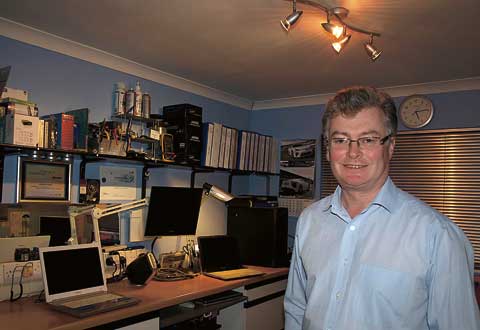 Setting up his own business was the last thing Richard Davies planned to do when he left the Submarine Service after 22 years. However during his time at sea he recognised that the on board computer systems held no fear for him and that given the opportunity, this environment was where his future lay.
He worked hard at gaining the Microsoft Qualifications that would be needed to work in the industry outside the Navy and so, with the encouragement of his wife and business partner Sally; Richard Davies Computer Services was born. The decision not to have premises in town has proved pivotal to their ability to respond to whatever comes their way.
Richard will often do complex work in the quiet of the evening without the distraction that a busy daytime office brings. That flexible approach continues when a client needs a solution that involves working out of office hours to minimise downtime – crucial if you are running a business and have employees who can’t work. Home users will also know that breakdowns always occur when least convenient! Remote assistance software, enabling Richard to work on a machine across the internet at a client’s invitation has obvious advantages for everyone and has been a great addition to Richard’s services. Most usually the software is installed in the workshop and always at the client’s request. In this way, existing customers can get support, diagnosis and help whilst sitting in front of their PC. Never wishing to be retailers but service providers means truly impartial advice when it comes to recommending hardware or software to clients. Should someone have a particular favourite software package then Richard will incorporate their requirement into the computer that he builds for them, advising them of alternatives if it is no longer compatible with today’s technology.
Clients looking at the www.rdcs.com website will find several core machines assembled by Richard using carefully researched and quality assured parts. The vast majority of the 500 bespoke computers built by RDCS for local homes and businesses over the last 10 years will be one of these. Taking care to source quality components is a time consuming job but means that each PC comes with a 2 year parts guarantee, so it’s time well spent.